
When I say text editor, I mean a program that allows users to create, edit, and save plain text files. It is not intended to be a full-fledged IDE or word processor, but rather a lightweight application that focuses on the core functionalities of text editing. I might expand its features later such as adding support for images, formatting options, …, but for now, the primary goal is to build a solid foundation for basic text editing tasks.
Why a Text Editor?
With the current rise of AI and AI in coding, I experienced that it’s incredibly tempting to rely on AI tools for code generation. I have to admit, I have used AI tools to help me write code in the past. Both for personal projects and academic assignments. However, relying too much on these tools brought several (unexpected) side effects:
- A lack of understanding in the code: I often found myself using code I didn’t fully grasp, which made troubleshooting and further development difficult.
- Frustrating development cycle: Debugging became more challenging because I didn’t always know how the generated code worked. And when things went wrong, AI tools weren’t always helpful in explaining or fixing the issues.
- I could feel myself getting worse: My problem-solving and coding skills started to decline since I wasn’t practicing them as much.
- I enjoyed coding way less: The creative and rewarding aspects of coding diminished when I wasn’t actively engaged in the process.
- Maybe the most important one: I never actually learned something new: By letting AI do the heavy lifting, I missed out on valuable learning opportunities.
So, I decided that I needed a project that would require me to learn new things and actively code, without relying on AI tools. So i decided to build a simple text editor from scratch, since a text editor is a manageable project that still involves a variety of coding challenges. It is one of those projects that seems simple on the surface, but actually requires a good understanding of programming concepts and data structures to implement effectively. During this development I try not to use any AI tools, but instead focus on researching, learning, and coding everything myself.
End goal
The end goal of this project is to create a fast, minimal, yet highly usable text editor from scratch. I want it to support basic text editing features, efficient rendering, and smooth user interactions.
The key features I want to achieve are:
- Responsive keyboard input and intuitive cursor movement
- Efficient text rendering with a bitmap font
- A robust data structure for handling large files
- Undo/redo functionality and selection support
- Clean, maintainable code
Technology Stack
I am building this text editor using C# and OpenTK , which is a low-level graphics library for .NET. This allows me to use OpenGL for rendering, giving me more control over performance and graphics compared to higher-level frameworks. It also makes sure I implement everything myself, and don’t rely on any built-in text editing components from existing frameworks.
I chose C# because I am already familiar with it, and it provides a good balance between performance and ease of development. I wanted to focus on learning new concepts, rather that learning both a new language and new concepts at the same time. As I personally believe it is better to learn one thing at a time.
OpenTK is a great choice for this project because it gives me direct access to OpenGL, which is essential for achieving the performance I want in rendering text efficiently.
Current Progress
At this stage, I have established the core rendering pipeline using OpenGL. The editor can open a window, map pixel coordinates, and render rectangles, individual characters, and strings with a custom bitmap font atlas. Alpha blending and textured quads are in place for smooth and clear text rendering. Beyond basic text display, the rendering system supports variable text sizes, adjustable line spacing, and even image rendering with transparency support. All rendered efficiently through OpenGL.
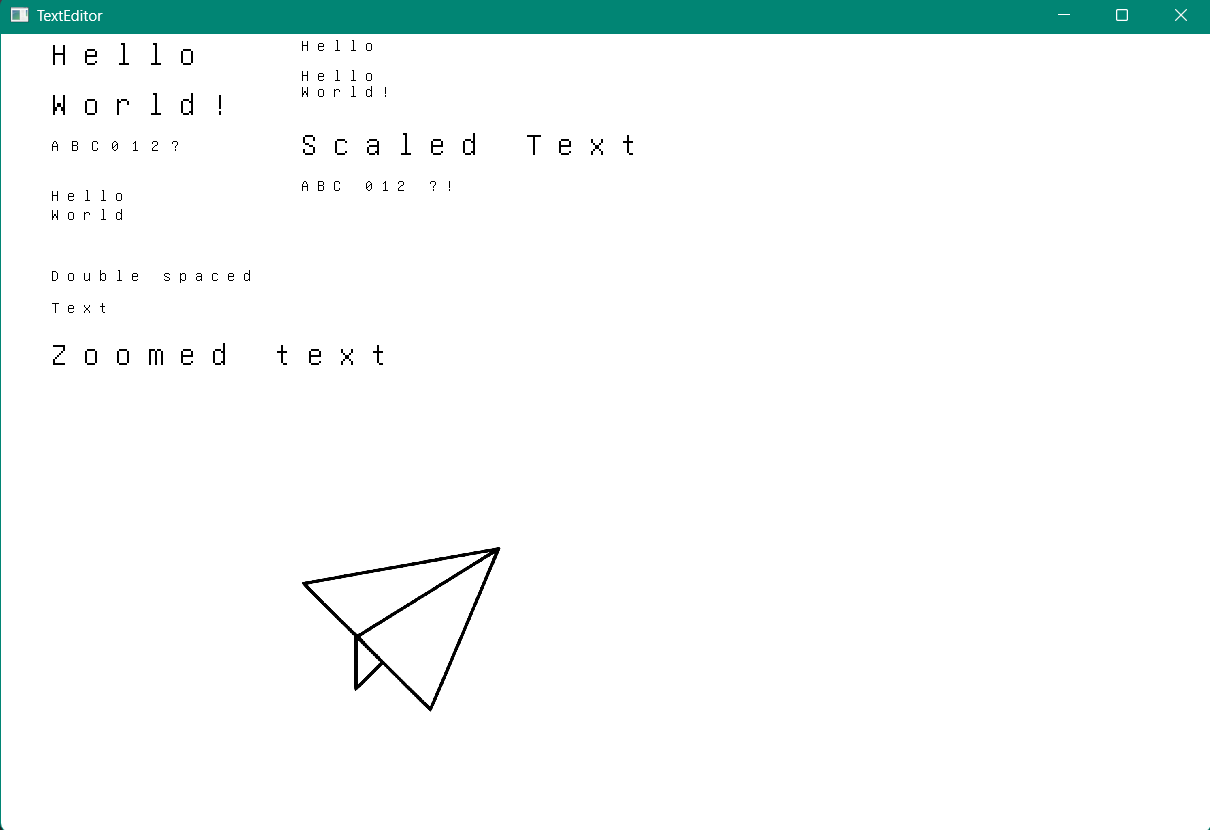
On the editing side, I’ve implemented a basic TextBuffer using a List<string> to store lines of text, along with a simple cursor struct to track the current editing position. This setup allows for basic text manipulation and cursor movement.
Currently the viewport renderer is fully functional: typed characters appear immediately in the window, the arrow keys move the cursor and scroll the view when needed. We can create new files, open existing ones, save changes, or even make a new file. This gives us a solid foundation for adding selection, undo/redo and more efficient text-buffer structures down the line. Our editor also tracks a preferred column: when moving up or down the cursor attempts to snap back to that column. If a target line is shorter the cursor temporarily moves to the line end, but the preferred column is remembered so returning to longer lines restores the original horizontal position. This is something I personally haven’t really thought about before, but it is a common feature in most text editors that you only notice when it is missing. It is a small detail, but it makes a big difference in the user experience.
As the project evolves, I plan to replace the current List<string> approach with a more efficient data structure, such as a Gap buffer
, Rope
, or Piece table
, to better handle large files and improve editing performance. The next steps will focus on keyboard input, advanced cursor movement, and viewport management.
A note on learning and priorities
I should be transparent: while my goal was to avoid AI tools and learn everything myself, I did use AI assistance for the OpenGL/OpenTK rendering code. However, this was a deliberate choice about where to focus my learning.
My primary goal with this project is to deeply understand text editors, their architecture, data structures, cursor management, text buffers, undo/redo systems, and viewport logic. OpenGL is merely the UI layer that wraps my project. While important, spending weeks learning OpenGL fundamentals would have distracted me from my main objective.
That said, I didn’t blindly copy AI-generated OpenGL code. I made an effort to understand the concepts it introduced: vertex shaders, fragment shaders, VBOs (Vertex Buffer Objects) , VAOs (Vertex Array Objects) , even if I didn’t master or fully grasp them. This gives me enough understanding to work with the rendering pipeline while keeping my focus on the text editing logic.
I plan to revisit OpenGL properly in future projects where graphics programming will be the main focus. I might have some ideas already: procedural voxel landscapes, a solar system simulator, procedural terrain generation, or a retro arcade game. For this project, though, the text editor is the star, and OpenGL is just the supporting actor.
Looking Ahead
This project is still in its early stages, but I am already learning more than I expected. Working mainly without AI assistance has forced me to research and understand concepts I might have otherwise overlooked. While this is obvously slowing down development, it is a lot more rewarding when I finally get something working myself.
I am excited to tackle the next phases: keyboard input, viewport management, and eventually implementing proper data structures for text storage. Each step brings new challenges, but that’s exactly what makes this project so valuable.
If you’re ever considering a similar project, something that forces you to learn, to struggle with new concepts and to build something completely from scratch without shortcuts, premade libraries or AI assistance, i can highly recommend it. The learning is worth the effort.